Forth Pay Quick Start Guide
This guide describes the workflow necessary to enroll a customer within FORTH Pay. This guide assumes that the user has already completed the following activities:
- Authorized with a credentials set to receive an API key. Guide here: HERE
- API user understands our commonly used error codes that can be found HERE
- Administrative functions such as adding creditors, payees, and other account details have been handled prior to beginning this workflow
Workflow at a Glance:
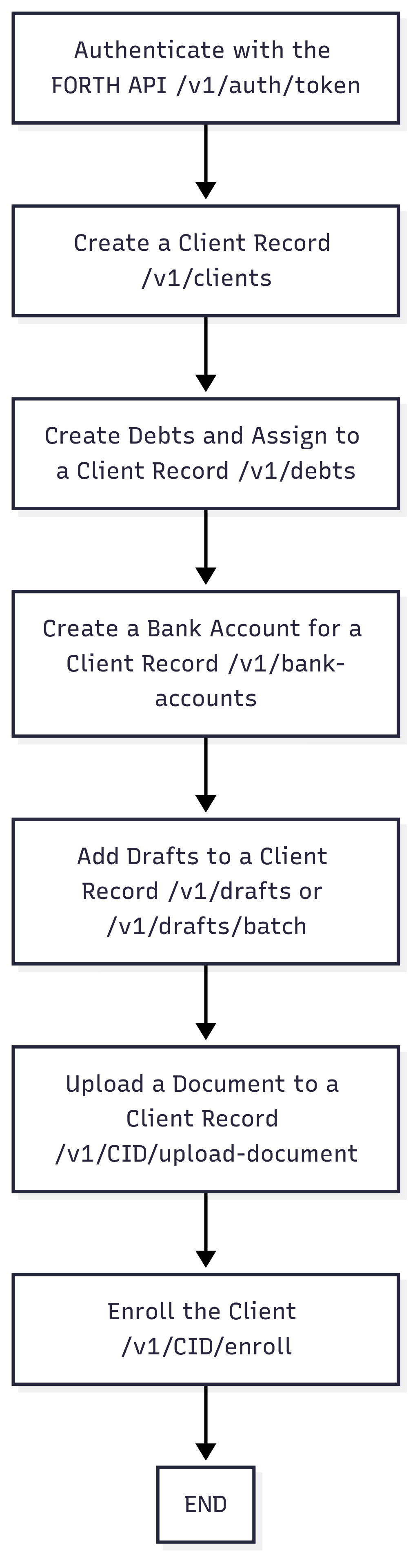
Enrollment Workflow Steps:
1
Authenticate
In order to start a user must authenticate with the FORTH API via the authorization endpoint. Authorization requires a Client ID and Secret pair that can be generated for a service user within your FORTH Pay account. These credentials must be maintained on the API user's end and must be used to refresh the API Key once it has been expired. The API Key must be used on all subsequent requests from hereinafter.
2
Create a Client Record
Once you have properly authenticated with the API and have received an API Key you are free to begin creating client records in the system. The client record endpoint requires basic PII information in order to proceed forward with enrollment. This endpoint returns a id (client id) field which must be used on subsequent requests to update details about the client record.
3
Add Debts to Client
Once the client record has been created and you have received a client_id you may begin adding debts to the contact via the debts endpoint. This endpoint will allow you to specify details of the debt you wish to add to the client record. This endpoint responds with a corresponding id (debt id) that will be needed later when settling a debt added to a contact record.
4
Add Bank Account to Client
Once a client record exists a bank account can be added to them via the bank account endpoint. This is the bank account that will be used to draft payments from.
5
Add Drafts to Client
Adding drafts/payment schedules to a client can be handled one of two ways. Individually via the drafts endpoint or as a batch via the batch endpoint. This endpoint contains a tp_id field to pass any outside transaction IDs that you may maintain within any external systems to. This endpoint also returns an id (FORTH transaciton id) that will be necessary to store if you intend to make updates to a draft prior to it processing.
6
Upload Authorization
You can upload the FORTH Pay authorization via the upload documents endpoint. This endpoint expects the document to be passed as a base64 encoded document. The id in the response relates to the document id within the FORTH Pay system.
7
Enroll in FORTH Pay
Once all prior steps have been followed you can enroll the customer via the enroll endpoint. This will mark the contact as ‘enrolled’ in the system and will be reviewed by the FORTH team before the intial hold is released and the client begins making payments into their program. You can check the status of a hold on the get client endpoint and reviewing the dpg_hold object in the response.
Post-enrollment Activities
After enrollment of the client and payments begin to process you can begin post-enrollment activities such as settling debts in the system. Below are activities involved in managing a client after enrollment in the system.
1
Create a Settlement
When you are ready to enter a settlement into the system you can do so via the settlements endpoint. You must pass the client_id and debt_id the settlement is occurring on. Additional creditor payment details must be passed as well in the creditor object with fields stored for the creditors you create with the creditor endpoints. Additional settlement payments can be added via the payments endpoint.
2
Add Settlement Fees
Fees for settlements can be added via the performance fee endpoint. Details such as settlement_id, client_id, and payee_id will be required to specify where the fees route to.
3
Manage Client Enrollment Status
Clients can be set to pause payments, resume payments, cancel the program, graduate the program, or re-enrolled in the program via their corresponding endpoints. These will update the client to their specified enrollment status based on which endpoint you interact with.
What made this section unhelpful for you?


On this page
- Forth Pay Quick Start Guide