Forth Pay API Workflow Guide
Introduction
This guide has been developed to describe elements of the FORTH Pay API system, with detailed descriptions of each endpoint to inform you how our API framework works.
- For information on Authentication and Authorization, Click HERE
- For information on our Commonly Used Error Codes, Click HERE
- For important notes and reminders, go the end of this article.
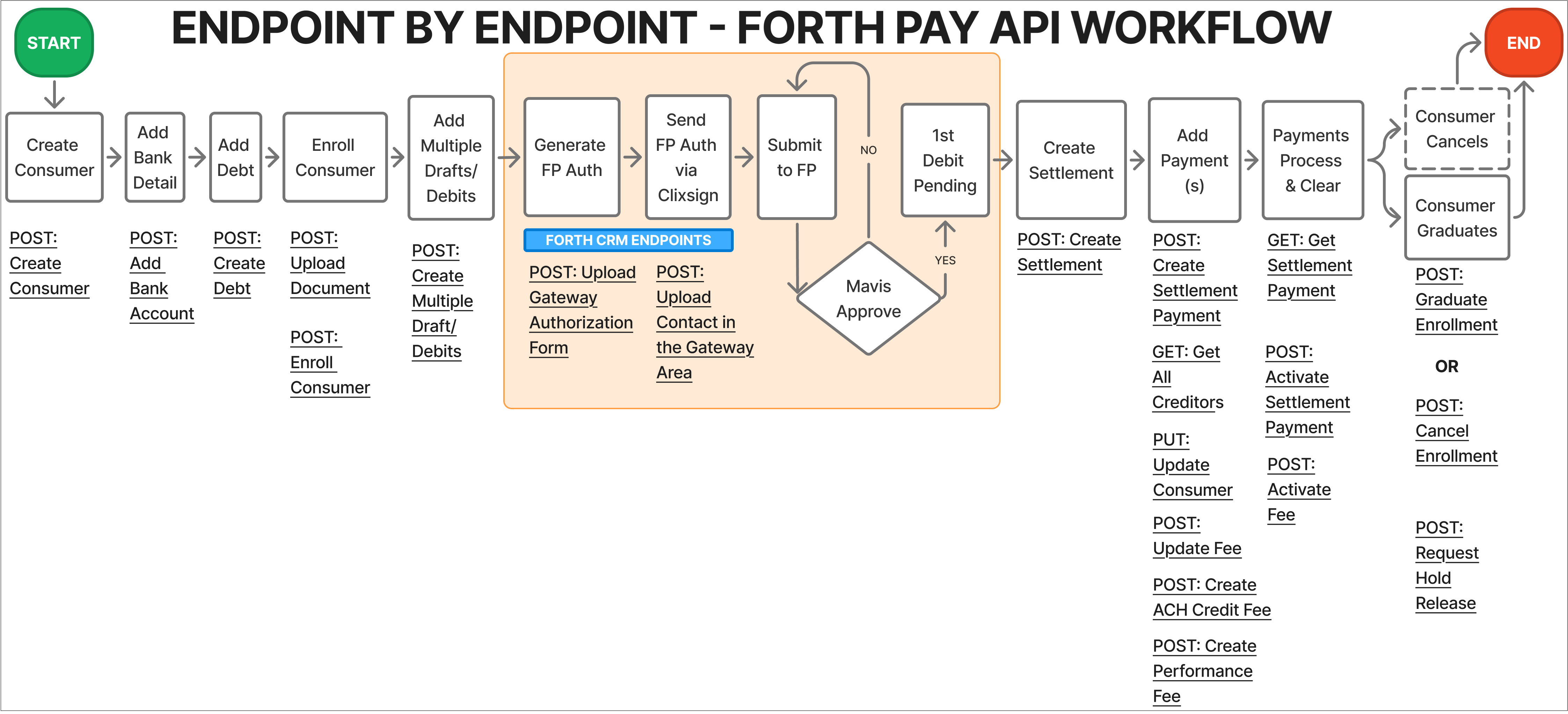
General Workflow
Use the endpoints listed below in the order they are listed to facilitate your API experience with FORTH Pay.
1
Create Client
This endpoint makes it efficient to add a new client, just enter their details, like the name, contact info, and any initial settings, and the system will set up the record for you. No manual data entry, just a quick and efficient way to keep client information organized.
2
Add Bank Account
This endpoint sets up a bank account to fund the Forth Pay custodial account, keeping things efficient. Only one account can be on file, and adding a new one replaces the existing one. Users can provide details like account number, routing number, account type, and client/customer ID in the request body. If the client is currently enrolled, a hold will be placed, and a new bank authorization form will be needed to lift it.
3
Create Debt
This endpoint creates a debt record for a client, capturing essential details like creditor, debtor (client_id), debt amount, and due date. It is designed to keep debt tracking clear and organized, ensuring everything is properly documented for easy management.
4
Upload a Document (Optional)
This endpoint uploads a Forth Pay document and links it to a specific client, identified by {id}. The document is included in the request body as multipart/form-data, ensuring a secure and efficient association with the client’s record
5
Enroll Client
This endpoint allows users to enroll a specific client into a Forth program or service, providing enrollment details like program options and start dates in the request body. This section facilitates the seamless onboarding of clients into the desired program, streamlining the enrollment process for administrators and ensuring a smooth experience for clients.
6
Create Multiple Drafts/Debits
This endpoint lets you create several draft items at once, saving you time and effort. Instead of adding them one by one, you can send a single request with a JSON array of drafts, making bulk processing smooth and efficient. If you’re managing multiple transactions, this is the perfect way to keep things streamlined.
7
Create Settlement
This endpoint creates a new client settlement entry, requiring an array of settlement payment objects for proper setup. Before proceeding, use creditor endpoints to query for valid creditors. The request body should contain a JSON object outlining the settlement details, ensuring all relevant data is included.
8
Create Settlement Payment
This endpoint creates a new payment record within a settlement entry, allowing users to initiate a payment with all necessary details. The request body should include a JSON object specifying the payment information, ensuring everything is clear and properly structured.
9
Get All Creditors
This endpoint provides you a comprehensive view of all creditors associated with a project, enabling easy organization and access to key creditor details. You can filter and sort creditors based on specific criteria, such as name or location, streamlining financial coordination and management within the project.
10
Update Client
If you need to update a client’s details, enter their unique {id} and specify the fields that need to be changed. Instead of hunting down records manually, you can streamline updates and keep client information accurate and up to date
11
Update Fee
This endpoint lets you update an existing fee configuration, identified by its unique {id}. The request body should include a JSON object with the new details, ensuring the fee remains accurate and properly structured.
12
Create ACH Credit Fee
This endpoint creates a new ACH credit fee entry, making it easy to define and configure fees for Automated Clearing House (ACH) credit transactions. The request body should include all necessary details to ensure accurate fee processing.
13
Create Performance Fee
This endpoint sets up a new performance fee entry, allowing users to define fees based on performance metrics. The request body should include all necessary details to ensure accurate configuration and application of the fee.
14
Get Settlement Payment
This endpoint lets users access specific payment details using a unique identifier, making financial tracking simple and efficient. Users can view transaction type, amount, and key dates, ensuring clear and accurate record-keeping. With this functionality, managing client payments is straightforward and hassle-free.
15
Activate Settlement Payment
This endpoint activates a specific payment record, identified by its unique {id}, setting the payment into motion. Once active, the payment moves forward in processing or finalization within the system.
16
Activate Fee
This endpoint activates a specific fee entry, identified by its unique {id}, making it applicable for transactions and processes. Once activated, the fee can be used as intended within the system.
17
Graduate Enrollment
This endpoint confirms a client’s successful completion or graduation from an enrolled program, using their unique {id} for identification. This action may update their status or modify associated records, ensuring their progress is accurately reflected in the system.
NOTE : Cancellation of a program is possible. Use the Cancel Enrollment endpoint to remove a client from an enrolled program or service, using their unique {id} for identification. The reason_id parameter allows users to specify the reason for cancellation. You may also use the Generate Account Closure Form endpoint.
18
Request Hold Release
If a client has a hold that needs to be lifted, this endpoint lets you request its removal from a program or obligation. Since some holds might need approval or have specific conditions, the system ensures everything is handled properly before finalizing the release. It’s a straightforward way to keep things moving while following the necessary steps.
Additional Information222222222222
- Not Sufficient Funds (NSF) indicates a returned transaction, when your client has insufficient funds. This directly impacts Forth Pay return rates, and our objective is to keep return rates low. Once a client has an NSF, their account is placed on hold. If the clients wishes to continue with the program, they will have to sign the Forth Pay Auth Doc Risk Return Form.
- For some drsps, a client's account could be put on hold after one NSF. For others, it may take two or more NSFs for the same action to occur. This is because the business rules for placing a client's account on hold differ for each drsp.
What made this section unhelpful for you?


On this page
- Forth Pay API Workflow Guide