Authentication
Here is a quick description of authentication and authorization in the context of access to APIs:
- Authentication: This is the process of verifying your identity. When you make an API request, you prove your identity by providing a valid API Key.
- Authorization: Once authenticated, this is the process of confirming that you have permission to access a specific API resource or perform an action.
Connection Flow
All API endpoints require authentication. A valid API Key must be included when sending a request. If you do not have an API Key or your previous key has expired, you will need to obtain a new one by completing the following steps:
1
Access REST API Management Page
Log-in to the Forth CRM and navigate to the API Credentials Management Page.
2
Generate a Secret / Key Pair
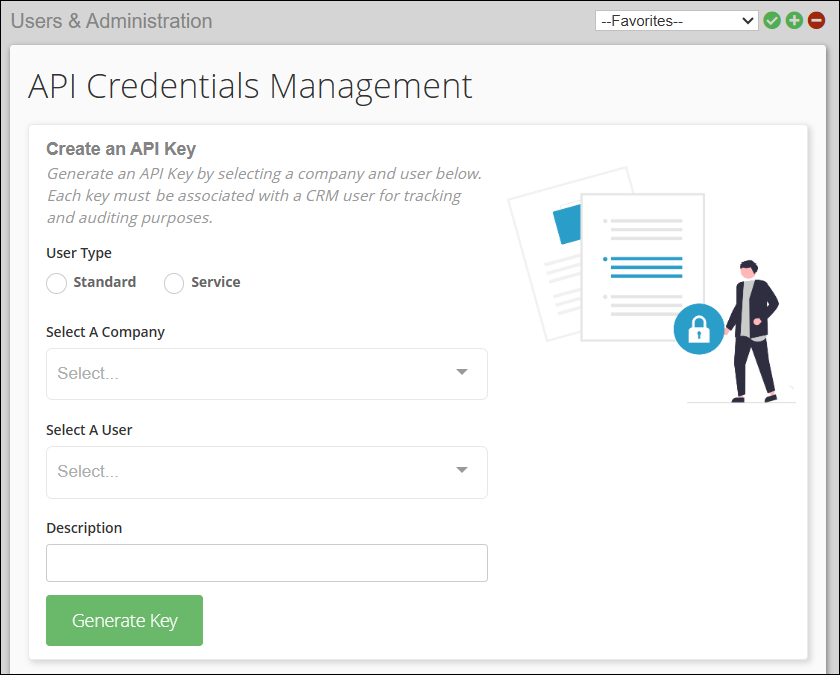
On the API Credentials Management Page:
- Select the User Type (Standard or Service)
- Choose a Company via the dropdown menu
- Select a User via the dropdown menu
- Enter a Description
- Click the Generate Key button at the bottom left of the section.
- A pop-up screen will appear, displaying your API Secret and Key ID (see example below).
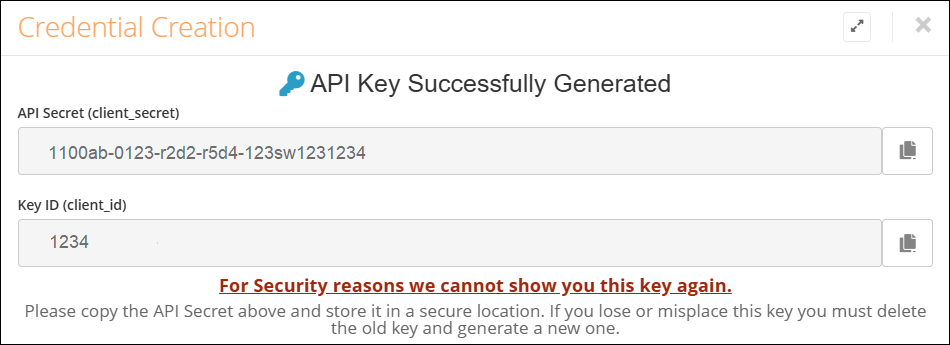
Copy and save both values in a secure location like a secrets or password manager. The API Secret will not be shown again
3
Obtain Access Token
Use the Get Access Token endpoint to swap your API Secret and Key ID for an access token. The access token expires after 10 days and must be refreshed using this endpoint before the expiration date.
Our APIs use Api Key-based authentication/authorization schemes to create a session. You must pass this access token in the Api-Key header in every HTTP request made to a Forth API endpoint.
4
Next step
What made this section unhelpful for you?


On this page
- Authentication